Here are steps to follow for when a till has an error message saying "Terminal Not Found" to a new card machine.
There will be instances where a site will call up saying that they have a new card machine on site and they have already spoken to paymentsense and everything is sorted their end and the only think left is for us to hook it up to the requested till (i.e, Till 3).
The first test you will want to do is check if the new TID of the card terminal is showing on the EFT application.
How to check:
- Open EFT application
- See what TID's are showing
- Restart the EFT Application
- When opened up again, check if there are any new TID.
If not, following the following steps:
Gather TID:
- Press the menu key (Grey button with black dot) - x2
- Select the "Supervisor" option
- Enter in the supervisor code (The customers will most likely have that)
- Select the "Log On" option
- Select the "All" option
This will then print a small paper out the card terminal with details on there including the TID
The reason you need to find out the TID is so that you can then enter it in the EFT config file in order for the till to identify it.
How to enter in the config file:
- Open ICRTouch folder
- Open the V3 pay at table folder
- Open the config file in there with notepad
- Enter in the TID in the following section:
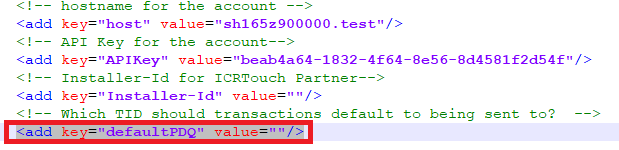
Once this is done, restart the EFT app once more and make sure that the new card terminal TID is still listed in the EFT app, then send a transaction using the till that the client has requested.
Trouble Shoot:
Notes:
Card Machines can be connected to a site in two different ways, either via a wireless network connection or a ethernet network connection. this can be seen at the top of the screen accordingly to which one of the icons are showing ( Network or Ethernet).
Was this article helpful?
That’s Great!
Thank you for your feedback
Sorry! We couldn't be helpful
Thank you for your feedback
Feedback sent
We appreciate your effort and will try to fix the article